El silencio está ocupado (The Silence Is Occupied)· Three in the Studio
An image that should not have been there
While editing El silencio está ocupado (The Silence Is Occupied), an image from MASAS appeared where it did not belong. It lasted just one frame, at 01:30:22. It was easy to miss, but once I had seen it, I could not leave it in the work.
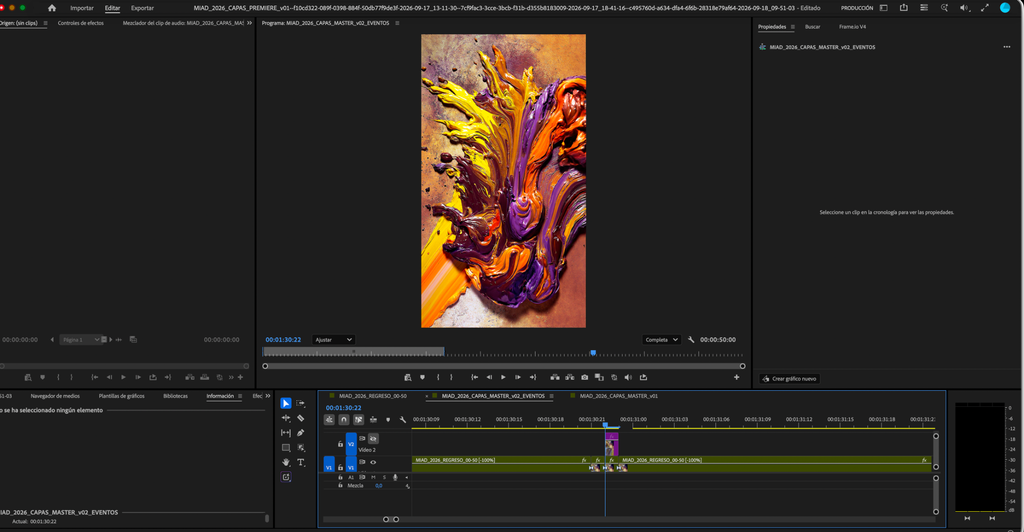
The image seemed to come from REGRESO, a section of the sequence played in reverse. Premiere pointed to a frame in that material as a possible source. We checked it and found something that did not add up: the corresponding frame was clean.
The AI suggested several possible explanations. Perhaps it was the cache, frame interpolation, nesting or the way Premiere was reading the reversed clip. We restarted Premiere, changed settings and exported the frame. MASAS was still there, including in the exported file. It was not simply a display glitch in the editing window.
We even prepared a temporary fix: placing a clean image over the anomaly for one frame. It would have hidden MASAS. But we still did not know why it appeared.
When we zoomed far into the timeline, we found the cause. A real, single-frame fragment of IRRUPCIÓN MASAS was hidden on track V5. We removed it and confirmed that the image disappeared. The patch was no longer needed.
An explanation we had to let go
What interests me about this episode is not that the AI got it wrong. Its hypotheses helped us organise the tests and keep investigating. The problem would have been to accept one simply because it sounded convincing.
I did not know in advance where that fragment was either. But I could see that the explanation did not fit what was happening: the frame identified as the source was clean, and MASAS still appeared in the export. That contradiction meant the problem was not solved.
Days later, we found a similar case. A brief flicker before REGRESO seemed to come from the visible layers, VIENTO or VERDE. The cause lay underneath: there was no image on the base track. Once we extended GRANATE and smoothed the join, the flicker disappeared.
Both episodes changed the way we review the edit. When an anomaly appears, we identify the exact moment, check every track and distinguish what a tool points to from what a test actually proves.
What deserves to be remembered
If we had recorded only “delete one frame from V5”, we would have kept the solution but lost an important part of the process. We also needed to record that REGRESO, interpolation and the cache had been considered and ruled out. A useful memory must make it possible to correct what once seemed true.
This episode also makes a difference between us clear. The AI helps me solve practical problems: it sorts through the clues, suggests tests and explains what might be happening in Premiere. But in the way we work together, it does not see the work as I do. It relies on timecodes, clip names, settings, my descriptions and the screenshots I show it. Even when it analyses an image, it is not watching the movement and sensing its effect within the work as I am.
I see MASAS appear, even if it lasts just one frame. I also see when a flicker breaks the continuity, or when a correction conceals a fault without fixing it. That perception is what makes me stop and say that something is still wrong.
The AI can help me find the cause and check the solution. My eye keeps the question open until the image gives us an answer. That is why what we solved deserves to be remembered, along with the explanations we had to abandon.